Firefox just added built-in ad blocking on iPhone. Do you still need a separate blocker?

On September 1, Mozilla announced a built-in ad blocker for Firefox on iOS that it says “blocks many third-party ads and ad-related trackers before they load.” There’s no extension to install: users can simply turn it on in Firefox’s settings.

For people who already use Firefox on their iPhone, this is a welcome upgrade. It offers a quick way to see fewer ads without adding another app or changing browsers. Still, the feature only takes you so far. Search ads, ads served directly by the sites you visit, and Firefox’s own sponsored content will remain, and you get little say over what is blocked. How helpful this built-in blocker is really comes down to what you expect from it — and how many ads you're willing to ignore.

That also points to a wider iOS problem: the browser you choose largely decides which blocking tools you can use. We’ll come back to Apple’s role in that. First, let’s look at how Firefox’s blocker works and where it stops.

What Firefox's new blocker actually does

Firefox uses the content-blocking tools built into WebKit, Apple’s browser engine, together with rules from EasyList.

EasyList is a community-made filter list used by well-known blockers such as uBlock Origin and Adblock Plus.

A bit of history:AdGuard’s Base filter has always included most EasyList rules, but it has never been just EasyList: we’ve been developing and expanding it ourselves from the start.

Using the same list doesn’t guarantee the same results, though. These also depend on the other filters and filtering methods each blocker supports, how often its rules are updated, and what the operating system allows.

Mozilla says its built-in blocker stops many third-party ads — ads loaded from advertising networks separate from the site you’re visiting. Firefox blocks web addresses that match its filtering rules. It also stops some ad trackers and works alongside Enhanced Tracking Protection.

The blocker is free and turned off by default. To enable it, go to Settings → Browsing → Ad Blocker. According to Mozilla, the feature is rolling out gradually, so the option may not be available to everyone yet. It also requires the remote improvements setting to be enabled.

Because the blocker is baked into Firefox, it only filters content you open in that browser. If you switch to Safari, open the YouTube app, or play a game with ads, it won’t affect the advertising you see there. Its protection stops at Firefox, rather than covering your iPhone as a whole.

So, which ads still slip through?

Firefox’s built-in blocker won’t block these three main types of ads:

  • First-party ads delivered directly by the website you’re visiting

  • Ads in search results, such as sponsored results shown by Google, Bing, or other search engines

  • Firefox’s own sponsored content, such as sponsored shortcuts on the new tab page

Why leave them in? First-party ads can be harder to block cleanly because their requests often come from the same website as the content. Blocking the website’s requests too broadly could also break the article, video, or other content you came for.

Search ads are a different case. Leaving them untouched makes sense for Mozilla’s wallet. Search partnerships are a major source of its income. In 2024, Mozilla received $498 million in royalties — around 73% of its $680 million in total revenue and support. The same logic applies to Firefox’s own sponsored content: these placements benefit Mozilla directly. But you can disable sponsored shortcuts separately in Firefox’s Homepage settings.

Customization is also pretty limited: you basically get an on/off switch. You can’t add more filter lists, write your own blocking rules, or tap an annoying element on a page to hide it. That keeps the feature easy to use, but it also leaves Firefox deciding what stays and what goes. If your goal is simply to see fewer ads in Firefox, turning on its blocker may be enough. But if you want to choose your filters, allow ads on specific sites, or decide whether search ads stay, Apple effectively pushes you towards Safari — the only browser on iOS where dedicated blockers get this level of access.

What free AdGuard for iOS offers

If Safari is your main browser, AdGuard for iOS offers more control even in its free version. You can choose filters for ads, trackers, websites in different languages, and annoyances such as cookie banners and social media widgets. You can also add favorite websites to your allowlist, so their ads remain visible while ads elsewhere are blocked.

In AdGuard for iOS, search ads are blocked under the default filter setup. If you want to see them, you can enable the optional Filter unblocking search ads and self-promotion. Here’s how the filter works.

There is one clear limit: in the free version of AdGuard for iOS, ad blocking is limited to Safari. Installing the app won’t block ads in Firefox or other apps. If you want to stay with Firefox and use a free blocker, Mozilla’s built-in feature is your best bet. If Safari is your main browser and you want more control, free AdGuard for iOS is the better fit.

That’s the free-to-free comparison. With AdGuard Premium, the picture changes: Safari gets stronger filtering, plus a separate DNS protection layer that works across browsers and apps on your iPhone.

What Premium adds to AdGuard for iOS

With Premium enabled, AdGuard for iOS goes further in two ways: it strengthens filtering in Safari and extends protection beyond the browser.

Advanced Protection helps with harder-to-block ads in Safari, including ads on YouTube. With it enabled, you can watch YouTube in Safari and have ads filtered automatically. For a more convenient option, you can find a video directly in the YouTube app, tap ShareMoreBlock YouTube Ads (by AdGuard), and it will open in AdGuard’s ad-free player.

The biggest difference from the free version is DNS protection. Once enabled, it can block connections to known advertising and tracking domains across all browsers and apps — including Firefox, Chrome, games, and shopping or news apps. Premium also unlocks custom filter lists and security filters. You can see the full comparison of free and paid features.

DNS protection still has its limits, though. Because it blocks whole domains, it can’t remove an ad served from the same domain as useful content without blocking that content too. It also can’t clean up the empty space a blocked ad leaves behind.

If Firefox is your main browser, the two blockers can work side by side. Firefox’s built-in blocker filters pages inside Firefox, while DNS protection in AdGuard for iOS blocks known ad and tracking domains across Firefox and other apps. They tackle different parts of the problem, so one doesn’t make the other redundant.
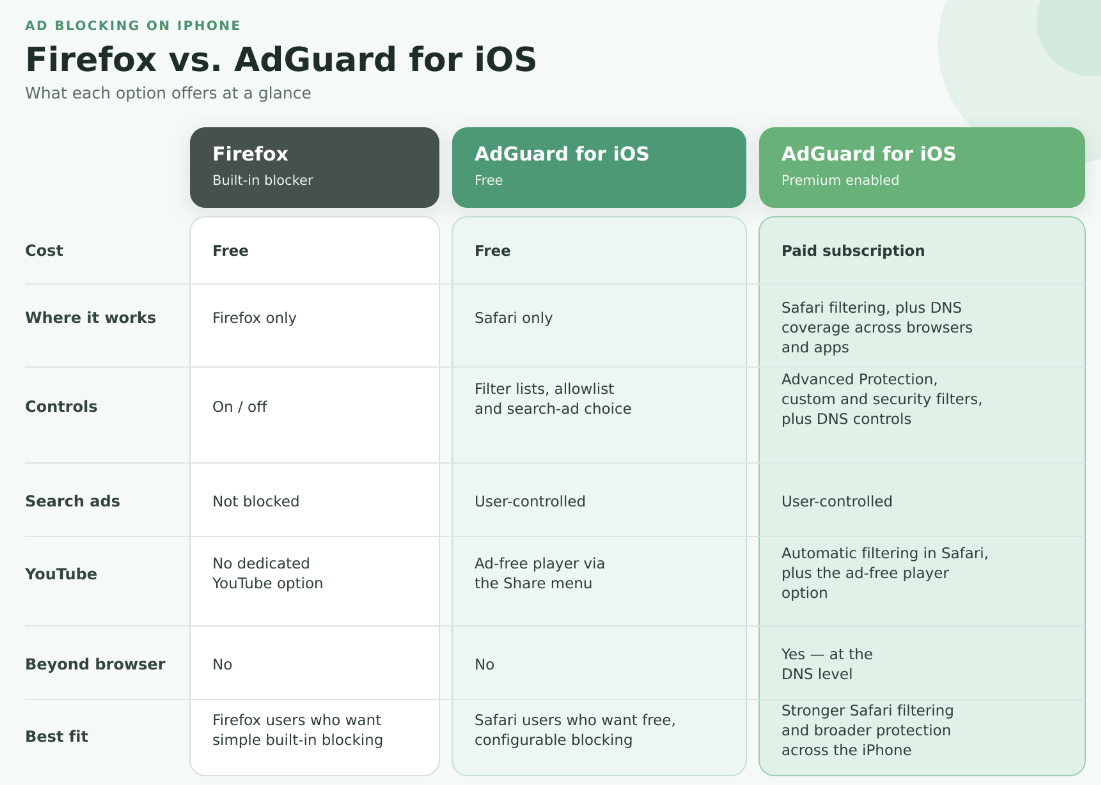
How built-in Firefox ad blocker compares to AdGuard for ioS

Why ad blocking on iOS is harder than it should be

Mozilla says the new Firefox blocker “illustrates a wider policy problem.” On desktop and Android, Firefox users can install independent add-ons, including ad blockers. On iOS, they don’t get the same choice. Apple’s App Review Guidelines generally require apps to remain self-contained and restrict them from downloading code that changes how they work. Mozilla says these rules, together with Apple’s browser policies, prevent it from bringing Firefox’s full add-on ecosystem to the iPhone. Instead, Mozilla has had to build ad blocking directly into Firefox.

That said, Apple does provide an official route for independent blockers on iOS — through Safari, and within limits it sets. Each content blocker can hold up to 150,000 filtering rules, and some rules that work on other platforms are not supported in Safari on iOS. To work around these limits, we split AdGuard’s filters across six content blockers and use a Safari web extension for Advanced Protection, which handles more complex ads.

Even with those workarounds, AdGuard’s page-level filtering remains tied to Safari and cannot simply be carried over to Firefox. DNS protection can block known advertising and tracking domains in Firefox, but it cannot inspect the page and remove individual elements in the same way. A dedicated iOS blocker can therefore add another layer of protection to Firefox, but it cannot work there as a full browser extension.

In our view, this gives Safari an anticompetitive advantage. Apple controls iOS, runs the main channel for distributing iPhone apps, and develops Safari. Its own browser supports independent blocking extensions, while competing browsers cannot give users the same freedom to choose their blocker. If getting the filtering tools you want means moving to Safari, Apple’s rules are already influencing your choice of browser.

Firefox’s new blocker is a useful response to these limits, but it doesn’t make dedicated blockers unnecessary. Building an effective blocker is not simply a matter of plugging in EasyList and calling it done. EasyList is a common foundation used across different blockers. Popular dedicated blockers build on it with a whole stack of additional filters, and those filters have to be constantly maintained as websites and advertising techniques change.

The real difference is focus. Ad blocking is one of many features a browser developer has to maintain. For us, a dedicated blocker, it is the main job. Firefox can keep improving its own tool, but users shouldn’t be limited to whatever their browser chooses to build. Only Apple can give Firefox users the same choice of independent blockers that Safari users already have. The ball is in Apple’s court.


Suka postingan ini?
AdGuard VPN DNS AdGuard AdGuard Mail AdGuard Wallet
Layar utama AdGuard untuk Windows
Layar Perlindungan AdGuard untuk Windows, menampilkan fitur dan pengaturan perlindungan
Layar Statistik AdGuard untuk Windows, menampilkan statistik untuk iklan dan pelacak yang terblokir
Layar Pengelolaan aplikasi AdGuard untuk Windows, menampilkan opsi pengelolaan perlindungan untuk aplikasi yang terinstal di perangkat
20.440 20440 ulasan pengguna
Sempurna!

AdGuard untuk Windows — pemblokir iklan untuk PC Anda

AdGuard untuk Windows lebih dari sekadar pemblokir iklan. Ini adalah alat serbaguna yang memblokir iklan, mengontrol akses ke situs berbahaya, mempercepat pemuatan halaman, dan melindungi anak-anak dari konten yang tidak pantas
Dengan mengunduhnya Anda menerima ketentuan Perjanjian lisensi
Microsoft Store
Dengan mengunduhnya Anda menerima ketentuan Perjanjian lisensi
AdGuard untuk Windows v8.0, masa percobaan 14 hari
Layar utama AdGuard untuk Mac
Layar Mode Siluman AdGuard untuk Mac
20.440 20440 ulasan pengguna
Sempurna!

AdGuard untuk Mac — pemblokir iklan seluruh sistem

AdGuard untuk Mac adalah pemblokir iklan unik yang dirancang khusus untuk macOS. Selain melindungi Anda dari iklan yang mengganggu di browser dan aplikasi, ini juga melindungi Anda dari pelacakan, phishing, dan penipuan
Dengan mengunduhnya Anda menerima ketentuan Perjanjian lisensi
Pelajari lainnya
AdGuard untuk Mac v2.19, masa percobaan 14 hari
Layar utama AdGuard untuk Android
Layar Perlindungan pelacakan AdGuard untuk Android
Layar Pengelolaan aplikasi AdGuard untuk Android, menampilkan opsi pengelolaan perlindungan untuk aplikasi yang terinstal di perangkat
Layar Statistik AdGuard untuk Android, menampilkan statistik untuk iklan dan pelacak yang terblokir
Layar utama peramban privat AdGuard untuk Android
Kode QR untuk unduh AdGuard untuk Android
20.440 20440 ulasan pengguna
Sempurna!

AdGuard untuk Android: pemblokir iklan semua aplikasi

Memblokir iklan dan pelacak di semua browser, game, dan aplikasi lainnya. Melindungi privasi Anda dan memungkinkan Anda mengontrol bagaimana aplikasi Anda menggunakan internet. Diinstal melalui APK

Dengan mengunduhnya Anda menerima ketentuan Perjanjian lisensi
Pelajari lainnya
Pindai untuk mengunduh
Gunakan pembaca kode QR yang tersedia di perangkat Anda
AdGuard untuk Android v4.14, masa percobaan 14 hari
Layar utama AdGuard untuk iOS
Layar Perlindungan AdGuard untuk iOS, menampilkan fitur dan pengaturan perlindungan
Layar Statistik AdGuard untuk iOS, menampilkan statistik untuk iklan dan pelacak yang terblokir
Kode QR untuk unduh AdGuard untuk iOS
20.440 20440 ulasan pengguna
Sempurna!

AdGuard untuk iOS — pemblokir iklan di luar Safari

Pemblokir iklan iOS terbaik untuk iPhone dan iPad. AdGuard menghilangkan semua jenis iklan dan pelacak di Safari serta melindungi privasi Anda di semua aplikasi pada tingkat DNS

Dengan mengunduhnya Anda menerima ketentuan Perjanjian lisensi
Pelajari lainnya
Pindai untuk mengunduh
Gunakan pembaca kode QR yang tersedia di perangkat Anda
AdGuard untuk iOS versi 4.5
Layar utama AdGuard Content Blocker
Layar filter AdGuard Content Blocker
Layar pengaturan AdGuard Content Blocker
20.440 20440 ulasan pengguna
Sempurna!

Pemblokir Konten AdGuard

AdGuard Content Blocker menghilangkan semua jenis iklan di browser seluler yang mendukung teknologi pemblokiran konten — yaitu, Samsung Internet dan Yandex Browser. Fitur-fiturnya terbatas dibandingkan dengan AdGuard untuk Android, tetapi gratis, mudah dipasang, dan efisien
Dengan mengunduhnya Anda menerima ketentuan Perjanjian lisensi
Pelajari lainnya
Pemblokir Konten AdGuard versi 2.8
Layar utama AdGuard Browser Extension
Layar Perlindungan pelacakan AdGuard Browser Extension
20.440 20440 ulasan pengguna
Sempurna!

Ekstensi peramban AdGuard

AdGuard adalah ekstensi pemblokiran iklan tercepat dan paling ringan yang secara efektif memblokir semua jenis iklan di semua halaman web! Pilih AdGuard untuk browser yang Anda gunakan dan dapatkan penjelajahan bebas iklan, cepat, dan aman.
Pasang
Dengan mengunduhnya Anda menerima ketentuan Perjanjian lisensi
Pasang
Dengan mengunduhnya Anda menerima ketentuan Perjanjian lisensi
Pasang
Dengan mengunduhnya Anda menerima ketentuan Perjanjian lisensi
Pasang
Dengan mengunduhnya Anda menerima ketentuan Perjanjian lisensi
Pasang
Dengan mengunduhnya Anda menerima ketentuan Perjanjian lisensi
Pelajari lainnya
Pasang
Dengan mengunduhnya Anda menerima ketentuan Perjanjian lisensi
Pelajari lainnya
Ekstensi peramban AdGuard versi 5.5
Layar utama Asisten Peramban
20.440 20440 ulasan pengguna
Sempurna!

Asisten AdGuard

Sebuah ekstensi peramban pendamping untuk aplikasi AdGuard desktop. Ini mengizinkan Anda memblokir item kustom di situs web, menambahkan situs web ke daftar izinkan, dan mengirim laporan langsung dari peramban Anda
Asisten AdGuard versi 1.4
20.440 20440 ulasan pengguna
Sempurna!

AdGuard Home

AdGuard Home adalah solusi berbasis jaringan untuk memblokir iklan dan pelacak. Instal sekali di router Anda untuk mencakup semua perangkat di jaringan rumah Anda — tidak diperlukan perangkat lunak klien tambahan. Ini sangat penting untuk berbagai perangkat IoT yang sering menimbulkan ancaman bagi privasi Anda
AdGuard Home versi 0.107
Layar utama AdGuard Pro untuk iOS
Layar Perlindungan AdGuard Pro untuk iOS, menampilkan fitur dan pengaturan perlindungan
Layar statistik AdGuard Pro untuk iOS, menampilkan statistik untuk iklan dan pelacak yang terblokir
20.440 20440 ulasan pengguna
Sempurna!

AdGuard Pro untuk iOS

AdGuard Pro untuk iOS dilengkapi dengan semua fitur perlindungan pemblokiran iklan canggih. Aplikasi ini menawarkan fitur yang sama dengan versi berbayar AdGuard untuk iOS. Aplikasi ini unggul dalam memblokir iklan di Safari dan memungkinkan Anda menyesuaikan pengaturan DNS untuk perlindungan yang lebih baik. Aplikasi ini memblokir iklan di browser dan aplikasi, melindungi anak-anak Anda dari konten yang tidak pantas, dan menjaga keamanan data pribadi Anda.
Dengan mengunduhnya Anda menerima ketentuan Perjanjian lisensi
Pelajari lainnya
AdGuard Pro untuk iOS versi 4.5
Layar utama AdGuard Mini untuk Mac
Layar perlindungan Safari AdGuard Mini untuk Mac
Layar Buat aturan AdGuard Mini untuk Mac
20.440 20440 ulasan pengguna
Sempurna!

AdGuard Mini untuk Mac — pemblokir iklan Safari

AdGuard Mini untuk Mac adalah pemblokir iklan Safari yang kuat. Aplikasi ringan ini menghapus iklan, memblokir pelacak, dan mempercepat pemuatan halaman. Ini membantu Anda menjelajah Web di Safari tanpa gangguan dan menjaga data Anda tetap pribadi
Pasang
Dengan mengunduhnya Anda menerima ketentuan Perjanjian lisensi
Pelajari lainnya
AdGuard Mini untuk Mac versi 2.3
Layar utama AdGuard untuk Android TV dengan perlindungan diaktifkan
Layar pemblokiran iklan AdGuard untuk Android TV, menampilkan fitur dan pengaturannya
Layar pengaturan AdGuard untuk Android TV
Layar Pengelolaan aplikasi AdGuard untuk Android TV, menampilkan aplikasi tempat iklan dan pelacak terblokir
20.440 20440 ulasan pengguna
Sempurna!

AdGuard untuk Android TV

AdGuard untuk Android TV adalah satu-satunya aplikasi yang memblokir iklan, menjaga privasi Anda, dan bertindak sebagai firewall untuk Smart TV Anda. Dapatkan peringatan tentang ancaman web, gunakan DNS yang aman, dan dapatkan manfaatkan lalu lintas yang terenkripsi. Bersantailah dan selami acara favorit Anda dengan keamanan terbaik dan tanpa iklan!
AdGuard untuk Android TV v4.14, masa percobaan 14 hari
Maskot AdGuard, Agnar, memegang penguin Linux
20.440 20440 ulasan pengguna
Sempurna!

AdGuard untuk Linux

AdGuard untuk Linux adalah pemblokir iklan sistem luas pertama di dunia untuk Linux. Blokir iklan dan pelacak di tingkat perangkat, pilih dari filter yang sudah terinstal sebelumnya, atau tambahkan milikmu sendiri — semuanya melalui antar muka baris perintah
AdGuard untuk Linux versi 1.4
20.440 20440 ulasan pengguna
Sempurna!

AdGuard Temp Mail

Generator alamat e-mail sementara gratis yang membuat Anda tetap anonim dan melindungi privasi Anda. Tidak ada spam di kotak masuk utama Anda!
20.440 20440 ulasan pengguna
Sempurna!

AdGuard VPN

75 Lokasi Di Seluruh Dunia

Akses ke konten apa pun

Enkripsi yang kuat

Tanpa kebijakan log

Koneksi paling cepat

dukungan 24/7

Coba gratis
Dengan mengunduhnya Anda menerima ketentuan Perjanjian lisensi
Pelajari lainnya
20.440 20440 ulasan pengguna
Sempurna!

DNS AdGuard

AdGuard DNS adalah cara yang sangat andal untuk memblokir iklan internet tanpa perlu menginstal aplikasi apapun. Mudah digunakan, sepenuhnya gratis, mudah dipasang di perangkat mana saja, dan menyediakan fungsi minimal yang diperlukan untuk memblokir iklan, penghitung, situs web berbahaya, dan konten dewasa.
20.440 20440 ulasan pengguna
Sempurna!

AdGuard Mail

Lindungi identitas Anda, hindari spam, dan jaga keamanan kotak masuk Anda dengan alias dan alamat e-mail sementara kami. Nikmati layanan penerusan e-mail gratis serta aplikasi untuk semua sistem operasi.
20.440 20440 ulasan pengguna
Sempurna!

AdGuard Wallet

Dompet kripto yang aman dan pribadi yang memberi Anda kendali penuh atas aset Anda. Kelola beberapa dompet dan temukan ribuan mata uang kripto untuk disimpan, dikirim, dan ditukar
Mengunduh AdGuard Klik tombol yang ditujukkan oleh panah untuk memulai instalasi. Pilih "Buka" dan klik "OK", lalu tunggu file diunduh. Di jendela yang terbuka, seret ikon AdGuard ke folder "Aplikasi". Terima kasih telah memilih AdGuard! Pilih "Buka" dan klik "OK", lalu tunggu file diunduh. Di jendela yang terbuka, klik "Install". Terima kasih telah memilih AdGuard!
Instal AdGuard untuk perangkat ponsel juga